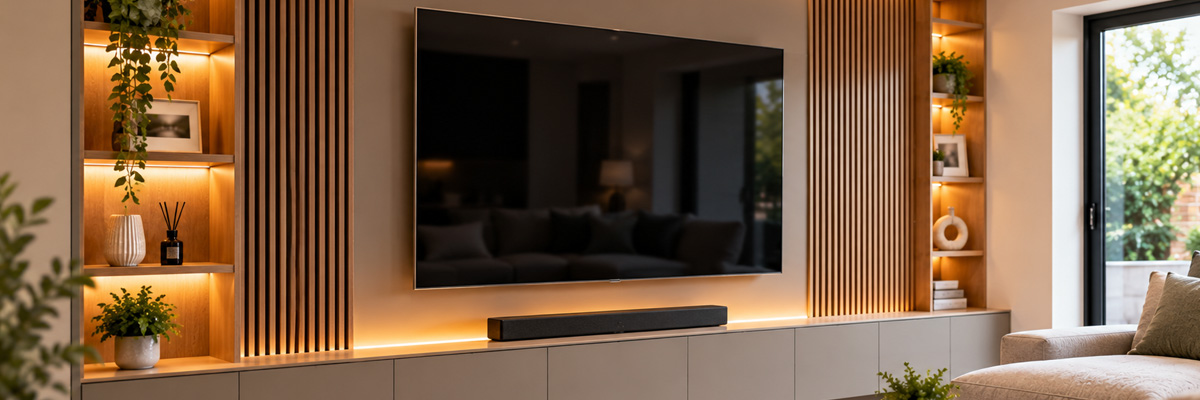
A media wall can turn a television into a clear focal point while keeping storage, lighting and entertainment equipment organised. However, even a well designed media wall can lose its clean appearance if HDMI leads, power cables and soundbar wires are left on show. Knowing how to hide TV cables in a media wall should therefore be part of the design from the start, not something added after the structure has been finished.
Cable management is more than making wires disappear. The route needs to suit the wall construction, the position of the TV, the equipment you use and any future changes. Power connections also need to be handled safely, while access should remain possible if a cable or device needs replacing. A little planning before installation can prevent difficult changes later.
What Is the Best Way to Hide TV Cables in a Media Wall?
Central Bedrooms and Kitchens provides the cleanest approach is usually to plan a dedicated cable route inside the media wall. This can create a hidden space between the TV position and the equipment, allowing HDMI, aerial, network and audio cables to pass out of sight. The exact method depends on the construction of the wall and the layout of the room.
A purpose built media wall gives you an advantage because the structure can be planned around the television and its connections. The TV position, soundbar, games console, streaming equipment and storage can all be considered together. CBK’s media wall service includes concealed cable management as part of its design options, alongside shelving, floating units, display niches and optional fireplace features. This means cable routes can be considered as part of the overall structure rather than treated as an afterthought.
The first step is to decide where every main device will sit. A television may need HDMI connections for a games console, streaming box or other source. A soundbar may need a connection close to the screen. Network equipment, aerial connections or other devices may also need access. Even if you do not use every connection today, allowing sensible space for future cables can make the wall easier to update.
The position of power points also matters. A TV power lead should not simply be pushed through a finished wall cavity. Electrical work and new sockets should be planned and completed by a suitably qualified professional. Power wiring and low voltage signal cables also need to be treated appropriately and kept in suitable routes. If the media wall includes an electric fireplace, the heating equipment and cable routes need to be planned together so that the finished installation is safe and practical.
How Should HDMI and Other TV Cables Be Routed?
The best cable route is usually one that is direct, protected and accessible. Sharp bends, unnecessary joins and cramped spaces can make installation harder and future cable changes more difficult. HDMI cables can also be sensitive to damage, so they should not be forced into tight spaces or crushed behind the TV.
Before the media wall is closed, it is useful to check that each cable can reach its intended connection point. Labelling cables at both ends can also save time later, particularly when several HDMI or network leads are installed. Once the wall is finished, it may be difficult to remember which cable connects to which device.
A conduit or accessible cable channel can provide another useful option. It creates a defined route for cables and can make future replacement easier. This is especially helpful when technology changes quickly. A TV installed today may later be connected to a new games console, sound system, streaming device or network connection. Planning an accessible route means a future cable change does not necessarily require opening the finished wall.
The area behind the TV should have enough room for the connections and mounting system. If the screen is mounted close to the wall, bulky plugs may need additional clearance. This is one reason why the TV bracket, screen size, connection layout and media wall depth should be considered together.
Soundbars and other equipment need their own cable planning. A soundbar may sit below or close to the TV, while a games console or streaming box may be stored in a cabinet or open shelf. If these positions are decided only after the media wall has been built, visible cables may become difficult to avoid. Planning the equipment positions at the design stage creates a much cleaner result.
How Can You Plan a Media Wall for Easy Cable Access?
The design should also allow for changes in technology. You may not need an Ethernet connection today, but your future setup could include a games console, smart home equipment or another networked device. Leaving an accessible route for additional low voltage cables can be useful. It is often easier to provide this during construction than to add it after the wall has been decorated.
The finish of the media wall should also be considered alongside cable management. CBK offers matt, wood effect and stone texture finishes, along with panel detailing, shelving and lighting options. The aim is to make the television and its supporting equipment feel part of the room rather than separate items attached to a wall.
A well planned design process can help identify these details before installation. CBK describes its media wall approach as starting with an assessment of room layout and desired functionality, followed by custom design, installation and final detailing. This is useful because cable management, storage and the visual proportions of the wall can be reviewed together.
Frequently Answered Questions
Can TV cables be hidden inside a media wall?
Yes, TV cables can be concealed within a media wall using planned cable routes, service voids or suitable cable management systems. The exact method depends on the construction and the type of cables being installed. Power wiring should be handled by a qualified electrician where electrical work is required.
Can I hide the TV power cable inside the media wall?
Do not simply run the TV’s standard power lead through a wall cavity. Power wiring needs the correct installation method and protection. If a new socket or altered electrical supply is required, use a suitably qualified electrician to complete the work safely.
Should HDMI cables be hidden behind a media wall?
Yes. HDMI cables can be routed through a planned cable channel or service void so they are not visible. It is worth allowing enough space for the cable and its connectors and avoiding tight bends or pressure that could damage the lead.
How do you hide soundbar cables in a media wall?
The soundbar position should be decided before the media wall is built. A cable route can then connect the soundbar position to the equipment or connection point without leaving wires hanging below the television. The route should remain accessible where practical.
Can a media wall hide cables for a games console?
Yes. If the console is stored inside a cabinet, shelf or open section, the design can include a hidden route between the console and the TV. Ventilation and access should also be considered when powered equipment is placed inside enclosed storage.